 FDZ Games
Minesweeper
The classic logic puzzle: read the numbers, flag every mine and clear the minefield as fast as you can.
About Minesweeper
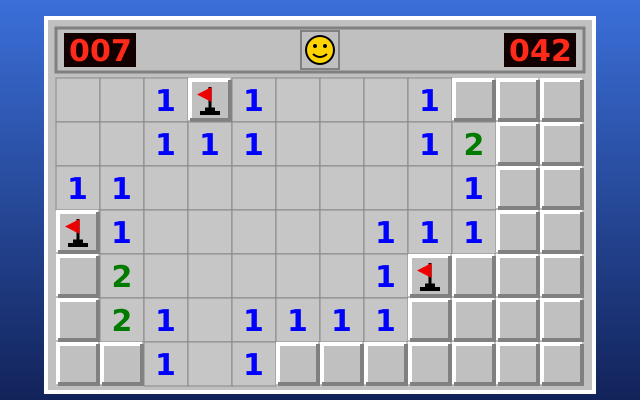
Minesweeper is the classic logic puzzle, rebuilt to load instantly and play well on any screen. A grid of covered cells hides a set number of mines. Open a cell and you either find a number or, if you were unlucky, a mine. Each number tells you exactly how many of the eight cells touching it hold a mine. Read those clues, work out where the mines must be, flag them, and open every safe cell to win. It is a game about careful thinking rather than fast fingers, although once the patterns become second nature, chasing a quicker clear time becomes its own reward.
This version keeps everything that made the original a fixture on office computers for decades. There are three standard boards: Beginner is 9 by 9 with 10 mines, Intermediate is 16 by 16 with 40 mines, and Expert is the wide 30 by 16 field with 99 mines. If you want something different, Custom lets you pick any width and height from 5 to 50 cells and choose how many mines to hide, so you can build a gentle board for a coffee break or a brutally dense one for a real challenge. The mine counter, the running timer and the smiley face that resets the board all sit exactly where you expect them.
Your first click is always safe. The mines are only laid after you choose your first cell, and the game keeps that cell and its neighbours clear, so every round begins by opening an area of the board instead of forcing a blind guess. Empty cells open their neighbours automatically, so a single lucky click can clear a big patch at once. From there it is up to you. Flag a cell with a right click or a long press, and add question marks as a reminder if you turn them on in the settings.
Experienced players will find chording here too. When a number already has the right count of flags around it, click the number (or press both mouse buttons together, or the middle button) and every other neighbour opens in one move. Chording is the biggest single speed-up in Minesweeper, and it is how fast players clear the Expert board in well under two minutes. Just be sure of your flags first: chording next to a wrong flag sets off the real mine.
The game was designed for phones as much as for desktop computers. Tap to open a cell, long-press to plant a flag and feel a short buzz on phones that support vibration, or switch the Reveal/Flag button so a tap flags instead. You can pinch to zoom the board or use the zoom buttons, and the large Expert field scrolls smoothly inside its frame without the page itself zooming by accident. On a keyboard, the arrow keys move a highlighted cursor, Space or Enter opens a cell, F places a flag and N starts a new game, so the whole game can be played without a mouse.
Your best time on each standard difficulty is saved in your browser, along with how many games you have played and won. The timer only runs while you are actually looking at the game: switch to another tab and it pauses until you come back. The board follows your device's light or dark setting and keeps the familiar grey, bevelled look of the original, with the classic colours for each number so a blue 1, a green 2 and a red 3 are readable at a glance.
Stuck on a spot that needs a guess, or hit a mine near the end of a long Expert game? When ads are available, two optional extras appear. Second chance undoes the click that hit a mine and flags that mine for you, so you can carry on. Hint either opens a cell that is guaranteed to be safe or flags a mine the numbers prove, preferring the moves you could have worked out yourself. Both are entirely optional, and wins that used them do not count toward your best times. Minesweeper is free, needs no download or account, and works in any modern browser on a phone, tablet or computer.
- Genre
- Logic puzzle
- Released
- Platform
- Web browser (phone, tablet, desktop)
- Price
- Free
- Developer
- FDZ Labs Inc.
Features
- Beginner 9×9, Intermediate 16×16 and Expert 30×16, plus fully custom boards up to 50×50
- First click is always safe and opens an area
- Chording, flags and optional question marks, just like the original
- Built for touch: tap to open, long-press to flag, a Reveal/Flag switch and pinch zoom
- Full keyboard play, best times per difficulty and light or dark themes
How to play
- Pick a difficulty and open any cell. Your first click is always safe.
- A number shows how many of the eight surrounding cells contain a mine.
- Right-click, long-press or use Flag mode to mark a cell you know is a mine.
- Click a number whose mines are all flagged to open the rest of its neighbours at once (chording).
- Open every cell that is not a mine to win. Hit a mine and the round is over.
- Press the smiley face or N to start a new game. Beat your best time on each difficulty.
Controls
Desktop
- Left click to open a cell
- Right click to place or remove a flag
- Click a satisfied number, press both buttons or the middle button to chord
- Arrow keys to move, Space or Enter to open, F to flag
- N or F2 new game, M switch tap mode, + and − zoom
Phone and tablet
- Tap to open a cell
- Long-press to place or remove a flag
- Tap a number to open around it when its flags are placed
- Reveal/Flag button switches what a tap does
- Pinch or use − and + to zoom; drag to scroll large boards
Tips and strategy
- Start with the edges of the open area: a 1 that touches only one covered cell means that cell is a mine.
- Learn the 1-2-1 pattern along a wall: the mines sit under the two 1s and the cell under the 2 is safe. In a 1-2-2-1 the mines sit under the two 2s.
- Subtract what you know. If a 2 already has one flagged neighbour, it behaves like a 1 for the cells that are left.
- Flag only what you need, then chord. Opening many cells with one click on a number is the fastest way to clear a board.
- When you truly have to guess, guess early and pick a corner or edge cell far from known mines, where a lucky opening clears the most ground.
Frequently asked questions
Is this Minesweeper free?
Yes. It runs in your browser for free, with no download and no account, on phones, tablets and computers.
Can my first click hit a mine?
No. The mines are placed after your first click, and that cell and its neighbours are always kept clear, so every game starts by opening an area.
How do I place a flag on a phone?
Long-press a covered cell until your phone buzzes, or tap the Reveal/Flag button so that each tap places a flag instead of opening the cell.
What is chording?
When a number already has that many flags around it, clicking or tapping the number opens all of its other neighbours at once. On a desktop you can also press both mouse buttons together or use the middle button.
What are the board sizes and how many mines are there?
Beginner is 9×9 with 10 mines, Intermediate is 16×16 with 40 and Expert is 30×16 with 99. Custom boards can be 5 to 50 cells wide and tall, with at least 9 safe cells.
Where are my best times saved?
Best times for Beginner, Intermediate and Expert are saved in your browser on this device. Wins that used a hint or a second chance don't count toward them.
Is every board solvable without guessing?
Not always. Like the original game, the mines are placed at random, so some boards end with a true 50/50. The optional Hint can open a safe cell when that happens.